| Author |
Message |
| Registered: March 14, 2007 | Reputation:  |  Posts: 4,937 Posts: 4,937 |
| |
| Registered: March 14, 2007 | | Reputation: | | Posts: 4,937 |
| |
| Registered: March 14, 2007 | | Reputation: | | Posts: 4,937 |
| |
| Registered: March 14, 2007 | | Reputation: | | Posts: 4,937 |
| | Posted: | | | | GsyLaunch 2.7.0 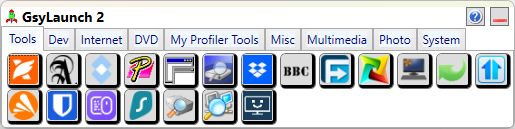 Just thought I'd make a new plug for this piece of software. Like I have stated before, it's not really related to DVD Profiler, but it's the one tool that I personally use the most. It keeps my desktop clean, and all my shortcuts organized into categories in a very compact way. It can hold more than just program shortcuts. It can also hold shortcuts to explorer folders. I use that to open my appdata folder, which is much easier than finding it in the normal way. With a little bit of help it can also hold shortcuts to specific entries in the registry, if that's something you have a need for. Finally, it can also hold shortcuts to web pages. There may be better ways to do that, but if there is a web page that relates strongly to one of your categories, it might be useful to keep a shortcut there. What's new in 2.7.0?- Add multiple named tabs. Especially useful for first time users to set up all the categories that are needed. - Move a button to another tab. Easier than doing copy/paste, although that is still an option. - In-place renaming of tabs. Now looks more like how renaming works in the file explorer. - All support windows now open center screen, so they don't end up in random places, and they will also be topmost so they don't get obscured. - The help file has been updated for new features, and expanded and corrected for some old features. Some of you have already tried GsyLaunch. I'd love to hear what you think of it, and if you have any suggestions for further improvements. | | | My freeware tools for DVD Profiler users.
Gunnar |
|
| Registered: April 4, 2007 |  Posts: 896 Posts: 896 |
| | Posted: | | | | It's a nice launcher for sure. It's just that personally I prefer text based launchers  | | | | - Jan |
|
| Registered: March 14, 2007 | | Reputation: | | Posts: 4,937 |
| | Posted: | | | | Quoting hydr0x: Quote:
It's a nice launcher for sure. It's just that personally I prefer text based launchers OK, that's fine. Would you care to share why you prefer text based? There is always something to be learned from other people's preferences. | | | My freeware tools for DVD Profiler users.
Gunnar |
|
| Registered: April 4, 2007 | | Posts: 896 |
| | Posted: | | | | Quoting GSyren: Quote:
Quoting hydr0x:
Quote:
It's a nice launcher for sure. It's just that personally I prefer text based launchers
OK, that's fine. Would you care to share why you prefer text based? There is always something to be learned from other people's preferences. It just fits my workflow better. I am more often already typing than using the mouse or using neither when I want to launch something, and a hidden launcher I can open via key combo and then type the thing I want to launch, hit enter, and go, is just faster for me. I additionally have a launch deck too which is basically a hardware version of your button approach. | | | | - Jan |
|
| Registered: March 14, 2007 | | Reputation: | | Posts: 4,937 |
| | Posted: | | | | Quoting hydr0x: Quote:
Quoting GSyren:
Quote:
Quoting hydr0x:
Quote:
It's a nice launcher for sure. It's just that personally I prefer text based launchers
OK, that's fine. Would you care to share why you prefer text based? There is always something to be learned from other people's preferences.
It just fits my workflow better. I am more often already typing than using the mouse or using neither when I want to launch something, and a hidden launcher I can open via key combo and then type the thing I want to launch, hit enter, and go, is just faster for me. I additionally have a launch deck too which is basically a hardware version of your button approach. OK, thanks for sharing!  | | | My freeware tools for DVD Profiler users.
Gunnar |
|
| Registered: March 14, 2007 | | Reputation: | | Posts: 4,937 |
| | Posted: | | | | GsyLaunch 2.8.0It's been some time since I did anything about GsyLaunch. The one thing that annoyed me was that I couldn't figure out how to add shortcuts from UWP programs (such as programs from Windows Store). Well, I finally figured out how to do that. There are a couple of things that you need to know, though. I have documented them in the help file. And there is now a menu item for the help file, so you don't have to browse through the files to open it. | | | My freeware tools for DVD Profiler users.
Gunnar |
|
| Registered: March 21, 2007 |  Posts: 171 Posts: 171 |
| | Posted: | | | | Just an FYI, the GsyLaunch web page still says that you "can't" launch UWP Apps.
Oh, and thanks for the app. I find it very usefull. |
|
| Registered: March 14, 2007 | | Reputation: | | Posts: 4,937 |
| |
| Registered: March 14, 2007 | | Reputation: | | Posts: 4,937 |
| | Posted: | | | | GsyLaunch 2.8.1The most annoying things for me just after a program has been released are if I find a bug, or if I realize that I have overlooked something obvious that would have made the program better. In this case it is the latter. The difference between an ordinary shortcut and a UWP shortcut is that GsyPlayer still needs the UWP shortcut. You can't just delete it. But you can move it away from the desktop. And that's what I initially suggested that the user would do. But for some reason I overlooked the (in hindsight blindingly obvious) solution to let GsyPlayer copy the entire shortcut to some suitable location and use it from there. So in GsyPlayer 2.8.1, if you drop a UWP shortcut into it, the program copies the shortcut into its appdata folder and uses it from there. Thus you can delete the original shortcut and keep your desktop as clear as you like. So for the user it works just the same as dropping a regular shortcut (or an exe file). In addition I have made two cosmetic changes. I don't know how to find out what the process name of a certain UWP program will be, so I cannot tell if it is running or not. So for UWP programs, the "Prevent double run" switch in the properties will be disabled. And the tooltip for the button will always have a grey background. And as usual, if you have recently visited the web page, you may have to refresh your browser to see the latest change. | | | My freeware tools for DVD Profiler users.
Gunnar | | | | Last edited: by GSyren |
|
| Registered: March 14, 2007 | | Reputation: | | Posts: 4,937 |
| | Posted: | | | | GsyLaunch 2.8.2Fixed a problem with the "Prevent double run" switch in Properties. It should have been disabled for UWP programs only, but got disabled for all. Nobody has mentioned my brain freeze in the previous post, where I mistakenly referred to this program as GsyPlayer. That's something that I just use myself, not a released program. I guess i'm getting confused in my old age.  | | | My freeware tools for DVD Profiler users.
Gunnar |
|