 |
|
|
|
Welcome to the Invelos forums. Please read the forum
rules before posting.
Read access to our public forums is open to everyone. To post messages, a free
registration is required.
If you have an Invelos account, sign in to post.
|
|
|
|
|

 Invelos Forums->DVD Profiler: Plugins
 |
Page:
1... 47 48 49  Previous Next Previous Next
|
|
Tool: Cast/Crew Edit 2 |
|
|
|
|
|
| Author |
Message |
| Registered: March 29, 2007 | Reputation:  |  Posts: 2,876 Posts: 2,876 |
| | Posted: | | | | Quoting mediadogg: Quote:
Here is the problem:
"System.IO.FileNotFoundException: The system cannot find the file specified. (Exception from HRESULT: 0x80070002)"
Usually due to a missing dll required by the plugin. Often caused by a mistake in the build by the author. Depending on how people install the plugin, some will get the error, some won't. If you can find an old install folder and examine the dll's to see if you can notice a potential required library file that is missing in the new folder. Maybe working with GSyren, who knows the developer game, and compare your install folder with his. I will give that a go as soon as I have time. Thank you so much for this. | | | | Marty - Registered July 10, 2004, User since 2002. |
| | Registered: March 14, 2007 | Reputation:  | | Posts: 335 |
| | Posted: | | | | Quoting GSyren: Quote:
I tested the latest version, and got no errors on scanning, but also got no data.
So, just a reminder, if CastCrewInfo isn't working you can get cast and crew with TmdbInfo.
It's not quite as advanced, but it is better than nothing (and it doesn't need constant updates since the Tmdb API doesn't change). Okay, so I'm not the only one. And yes, thanks for reminding me. I'll use your TmdbInfo in the interim. | | | | My DVD/Blu-ray Collection | | | | Last edited: by Lowpro |
|   | T!M | | Profiling since Dec. 2000 |
| Registered: March 13, 2007 | Reputation:  |  Posts: 8,859 Posts: 8,859 |
| | Posted: | | | | Quoting GSyren: Quote:
I tested the latest version, and got no errors on scanning, but also got no data. Same here. CastCrewEdit2 opens without a hitch, lets me browse to a movie or TV show, lets me click "Scan Page" and then promptly (maybe a tad too quick) says: "Parsing Complete" - but then there's no cast/crew data to paste into DVD Profiler. This is on Windows 11. If I'm going to "IMDb to DVD Profiler Transformation Data" in the "Edit Config File" menu, it immediately throws an error. Details: System.ComponentModel.Win32Exception (0x80004005): De bewerking is geannuleerd door de gebruiker bij System.Diagnostics.Process.StartWithShellExecuteEx(ProcessStartInfo startInfo) bij DoenaSoft.DVDProfiler.CastCrewEdit2.Forms.CastCrewEdit2BaseForm.OnIMDbToDVDProfilerTransformationDataToolStripMenuItemClick(Object sender, EventArgs e) in D:\Git\CastCrewEdit2\CastCrewEdit2\CastCrewEdit2\CastCrewEdit2\Forms\CastCrewEdit2BaseForm.cs:regel 198 bij System.Windows.Forms.ToolStripItem.RaiseEvent(Object key, EventArgs e) bij System.Windows.Forms.ToolStripMenuItem.OnClick(EventArgs e) bij System.Windows.Forms.ToolStripItem.HandleClick(EventArgs e) bij System.Windows.Forms.ToolStripItem.HandleMouseUp(MouseEventArgs e) bij System.Windows.Forms.ToolStrip.OnMouseUp(MouseEventArgs mea) bij System.Windows.Forms.ToolStripDropDown.OnMouseUp(MouseEventArgs mea) bij System.Windows.Forms.Control.WmMouseUp(Message& m, MouseButtons button, Int32 clicks) bij System.Windows.Forms.Control.WndProc(Message& m) bij System.Windows.Forms.ToolStrip.WndProc(Message& m) bij System.Windows.Forms.ToolStripDropDown.WndProc(Message& m) bij System.Windows.Forms.NativeWindow.Callback(IntPtr hWnd, Int32 msg, IntPtr wparam, IntPtr lparam) | | | | Last edited: by T!M |
| | Registered: March 14, 2007 | | Reputation: |  Posts: 4,945 Posts: 4,945 |
| | Posted: | | | | Quoting T!M: Quote:
If I'm going to "IMDb to DVD Profiler Transformation Data" in the "Edit Config File" menu, it immediately throws an error. Same here, but I get this: 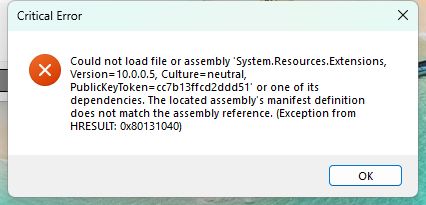 | | | My freeware tools for DVD Profiler users.
Gunnar |
| | Registered: March 18, 2007 | | Reputation: | | Posts: 6,544 |
| | Posted: | | | | Missing DLL. Try comparing the folder contents of an old installation that worked. | | | Thanks for your support.
Free Plugins available here.
Advanced plugins available here.
Hey, new product!!! BDPFrog. | | | | Last edited: by mediadogg |
| | Registered: March 29, 2007 | | Reputation: | | Posts: 2,876 |
| | Posted: | | | | Quoting mreeder50: Quote:
Quoting mediadogg:
Quote:
Here is the problem:
"System.IO.FileNotFoundException: The system cannot find the file specified. (Exception from HRESULT: 0x80070002)"
Usually due to a missing dll required by the plugin. Often caused by a mistake in the build by the author. Depending on how people install the plugin, some will get the error, some won't. If you can find an old install folder and examine the dll's to see if you can notice a potential required library file that is missing in the new folder. Maybe working with GSyren, who knows the developer game, and compare your install folder with his.
I will give that a go as soon as I have time. Thank you so much for this. Sorry it has been so long, but I finally tried to do the suggestions. They did not work. I went back to version 2.1.15.0 which works. As soon as I upgrade to version 2.1.15.2 by the upgrade or the whole program fresh, I get the same error. I have decided to stay with 2.1.15.0 which works. Thanks guys. Marty | | | | Marty - Registered July 10, 2004, User since 2002. |
| | Registered: March 18, 2007 | | Reputation: | | Posts: 6,544 |
| | Posted: | | | | Thanks for the feedback. | | | Thanks for your support.
Free Plugins available here.
Advanced plugins available here.
Hey, new product!!! BDPFrog. |
| | Registered: May 24, 2014 | | Posts: 18 |
| | Posted: | | | | I suggest to use AI for this task. With Copilot you can do something like:
Retrieve the first season of the TV series Gunsmoke from IMDb, access all episodes of that season, and extract the available crew information for each episode (especially directing and writing credits). Then generate a structured XML file that includes:
• a series header with the overall series crew (creators, main cast)
• an individual <episode> block for each of the 39 episodes
• the episode‑specific crew data as listed on IMDb
• meaningful attributes such as number, title, and imdb_id
The resulting XML file should be complete, consistent, and machine‑readable. |
| | Registered: May 24, 2014 | | Posts: 18 |
| | Posted: | | | | For invidual movies I got this copilot thing working now (not yet for serials). Use the following prompt (adaping the movie name):
You are a precise web‑scraping and data‑transformation agent.
**TASK**
Retrieve the IMDb page for the film **“Mein Schulfreund” (1960), directed by Robert Siodmak**.
Navigate to the **Full Cast & Crew** section and extract **all crew credits**, explicitly **excluding all cast/acting information**.
---
## **DATA EXTRACTION RULES**
### **1. Person Name Parsing**
For each crew member, split the IMDb‑listed name into:
- **FirstName**
- **MiddleName**
- **LastName**
Rules:
- If the name has two parts → first = FirstName, second = LastName, MiddleName = `""`.
- If the name has more than two parts →
- First token → FirstName
- Last token → LastName
- All tokens in between → MiddleName (space‑joined)
- Initials remain as written (e.g., “A.” stays “A.”).
---
### **2. Birth Year**
- If IMDb provides a birth year on the person’s profile → use that integer.
- If no birth year is available → use **0**.
---
### **3. CreditType and CreditSubtype Mapping**
Assign each credit to one of the following **CreditType** values:
- Direction
- Writing
- Production
- Cinematography
- Film Editing
- Music
- Sound
- Art
- Other
Then assign the appropriate **CreditSubtype**:
**Direction:** Director | Custom
**Writing:** Original Material by | Screenwriter | Writer | Original Characters | Created by | Story by | Developed by | Custom
**Production:** Producer | Executive Producer | Custom
**Cinematography:** Director of Photography | Cinematographer | Custom
**Film Editing:** Film Editor | Custom
**Music:** Composer | Song Writer | Theme by | Custom
**Sound:** Sound | Sound Designer | Supervising Sound Editor | Sound Editor | Sound Re‑Recording Mixer | Production Sound Mixer | Custom
**Art:** Production Designer | Art Director | Costume Designer | Make‑up Artist | Visual Effects | Make‑up Effects | Creature Design | Custom
**Other:** Custom
---
### **4. Optional Attributes**
- **CreditedAs** → include only if IMDb lists an alternative spelling (e.g., “as J.M. Simmel”).
- **CustomRole** → include only when:
- The role is not covered by the allowed subtypes, or
- The subtype is “Custom”.
Examples:
- “assistant director”
- “script consultant”
- “voice actor – dubbing (Italian)”
---
## **OUTPUT REQUIREMENTS**
Produce **one XML document** that **validates exactly** against the following XSD:
```xml
<?xml version="1.0" encoding="UTF-8" standalone="yes"?>
<xs:schema xmlns:xs="http://www.w3.org/2001/XMLSchema" elementFormDefault="qualified">
<xs:element name="CrewInformation" type="CrewInformation"/>
<xs:complexType name="CrewInformation">
<xs:sequence>
<xs:element name="Title" type="xs:string" minOccurs="1"/>
<xs:element name="Credits" type="Credits"/>
</xs:sequence>
</xs:complexType>
<xs:complexType name="Credit">
<xs:attribute name="FirstName" type="xs:string" use="required"/>
<xs:attribute name="MiddleName" type="xs:string" use="required"/>
<xs:attribute name="LastName" type="xs:string" use="required"/>
<xs:attribute name="BirthYear" type="xs:int"/>
<xs:attribute name="CreditType" type="xs:string" use="required"/>
<xs:attribute name="CreditSubtype" type="xs:string" use="required"/>
<xs:attribute name="CreditedAs" type="xs:string" use="optional"/>
<xs:attribute name="CustomRole" type="xs:string" use="optional"/>
</xs:complexType>
<xs:complexType name="Credits">
<xs:choice minOccurs="0" maxOccurs="unbounded">
<xs:element name="Credit" type="Credit"/>
</xs:choice>
</xs:complexType>
</xs:schema>
```
### **XML Structure**
```xml
<CrewInformation>
<Title>Mein Schulfreund – Crew (IMDb)</Title>
<Credits>
<!-- multiple <Credit .../> elements -->
</Credits>
</CrewInformation>
```
---
## **GOAL**
Produce a **complete, lossless, XSD‑valid XML representation** of all crew credits for *Mein Schulfreund* (1960), with correct name parsing, birth‑year resolution, and role classification. |
| | Registered: March 14, 2007 | Reputation:  | | Posts: 289 |
| | Posted: | | | | Quoting mreeder50: Quote:
Quoting mreeder50:
Quote:
Quoting mediadogg:
Quote:
Here is the problem:
"System.IO.FileNotFoundException: The system cannot find the file specified. (Exception from HRESULT: 0x80070002)"
Usually due to a missing dll required by the plugin. Often caused by a mistake in the build by the author. Depending on how people install the plugin, some will get the error, some won't. If you can find an old install folder and examine the dll's to see if you can notice a potential required library file that is missing in the new folder. Maybe working with GSyren, who knows the developer game, and compare your install folder with his.
I will give that a go as soon as I have time. Thank you so much for this.
Sorry it has been so long, but I finally tried to do the suggestions. They did not work.
I went back to version 2.1.15.0 which works. As soon as I upgrade to version 2.1.15.2 by the upgrade or the whole program fresh, I get the same error.
I have decided to stay with 2.1.15.0 which works.
Thanks guys.
Marty Can someone please help me download 2.1.15.0? | | | | Last edited: by JeroenX |
| | Registered: March 29, 2007 | | Reputation: | | Posts: 2,876 |
| | Posted: | | | | I could send it to you, I have the original zip file. | | | | Marty - Registered July 10, 2004, User since 2002. |
| | Registered: March 14, 2007 | | Reputation: | | Posts: 335 |
| | Posted: | | | | Quoting mreeder50: Quote:
I could send it to you, I have the original zip file. Is this application working for you? Sadly it's not working for me, no matter what version I use. No IMDB data is coming down. It's clearly not working for others as well. If it is working for some it would be cool to determine why. I've got $100 burning a hole in my pocket when an updated version of the application is offered that works with the current IMDB website. | | | | My DVD/Blu-ray Collection | | | | Last edited: by Lowpro |
| | Registered: March 29, 2007 | | Reputation: | | Posts: 2,876 |
| | Posted: | | | | Yes, the latest one does not. | | | | Marty - Registered July 10, 2004, User since 2002. |
| | Registered: March 14, 2007 | | Reputation: | | Posts: 289 |
| | Posted: | | | | Quoting mreeder50: Quote:
I could send it to you, I have the original zip file. PM sent | | | | Last edited: by JeroenX |
|
|
|
Invelos Forums->DVD Profiler: Plugins |
Page:
1... 47 48 49 Previous Next
|
|
|
|
|
|
|
|
|
|
 |